Binary to IP Binary to IP tool for network operations.

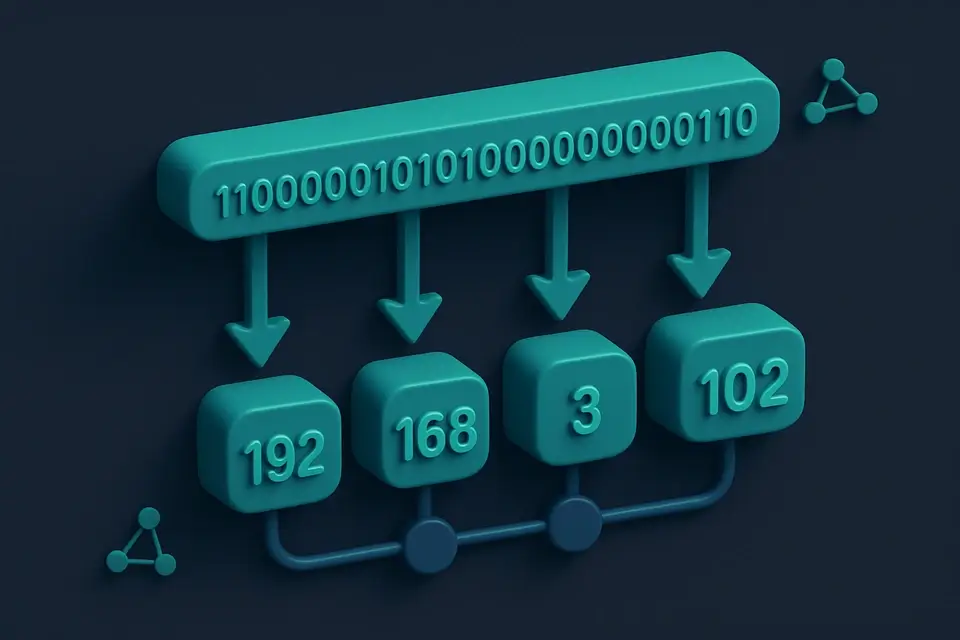
Binary to IP
Binary to IP tool for network operations.
Enter Binary Address
Type or paste your binary IP address.
Convert to IP
Click the convert button.
Copy the IP Address
Copy the converted IP address.
What Is Binary to IP?
A Binary to IP is a binary to ip converter that translates binary strings into IPv4 addresses in dotted decimal notation. Network engineers and developers use it to convert binary data into human-readable IP addresses. One specific problem it solves is handling batch conversions of multiple binary strings, which can be time-consuming when done manually.
The tool stands out due to its ability to process input in various formats, such as binary strings with dots, spaces, or dashes, and then ignore these non-essential characters during conversion. It also provides an octet breakdown for each converted IP address, displaying both the binary and decimal representations of each octet. This feature is particularly useful when working with complex network configurations.
When using it, users can switch between single and batch modes, allowing them to convert either a single binary string or multiple strings at once. In batch mode, the tool displays the number of valid and invalid conversions, making it easier to identify errors in the input data. By providing instant results and a mobile-friendly interface, the tool enables developers and network engineers to efficiently work with binary ip address converter tasks, such as converting binary to ipv4 online, without requiring any server-side processing or data transmission.
Why Use Binary to IP?
-
Instant binary-to-IP conversion
-
100% client-side
-
Mobile-friendly
-
No signup required
Common Use Cases
Development
Web dev and debugging.
Networking
Network config.
Education
Learn concepts.
Security
Security analysis.
Technical Guide
The tool works under the hood by using a combination of regular expressions and bitwise operations to process binary strings into IPv4 addresses in dotted decimal notation. It utilizes client-side JavaScript, specifically ES6+ syntax and React hooks such as useState, useCallback, and useMemo, to manage state and optimize performance. The input validation is handled by a custom function that checks for edge cases, ensuring the input string contains only 0s and 1s and has a length of exactly 32 bits. This validation is performed using JavaScript's built-in RegExp object and its test method.
When processing binary strings, it uses the String.prototype.replace method with a regular expression to remove non-essential characters such as dots, spaces, or dashes. The cleaned string is then split into octets using a for loop that iterates over the string in steps of 8 bits. Each octet is converted from binary to decimal using JavaScript's built-in parseInt function with base 2. The resulting decimal values are then joined together with dots to form the IPv4 address.
In batch mode, it uses an array map method to process each line of input as a separate binary string, applying the same conversion logic as in single mode. The results are stored in an array of objects, where each object contains the original input string, the converted IP address, and any error messages that occurred during processing. This data structure allows for easy display of valid and invalid conversions, making it easier to identify errors in the input data.
The tool also uses React's useMemo hook to memoize the results of expensive function calls, such as the conversion logic, and only recompute them when the input changes. This optimization helps improve performance by reducing unnecessary computations. Additionally, it employs a mobile-first responsive design approach, ensuring that the interface is accessible and usable on a wide range of devices.
The copyToClipboard function uses the navigator.clipboard API to copy text to the user's clipboard, providing a convenient way to transfer converted IP addresses to other applications. This API is supported by most modern browsers, making it a reliable choice for this functionality. By leveraging these technologies and techniques, the tool provides an efficient and user-friendly solution for converting binary strings to IPv4 addresses.
Tips & Best Practices
-
1Ignore dots, spaces, and dashes in binary input to simplify conversion
-
2Split batch inputs into separate lines for individual conversions
-
3Use the copy button to quickly copy converted IP addresses
-
4Enter exactly 32 binary digits for a valid IPv4 conversion
-
5Check the octet breakdown for detailed information on each part of the IP address
Related Tools


IP to Decimal
IP to Decimal tool for network operations.
🌐 Network & Web

What Is My Screen Resolution
What Is My Screen Resolution tool for network operations.
🌐 Network & Web

Query String Builder
Query String Builder tool for network operations.
🌐 Network & Web

WebSocket Echo Tester
WebSocket Echo Tester tool for network operations.
🌐 Network & WebFrequently Asked Questions
Q Is the binary to IP converter free to use?
Q Is it safe to convert binary to IP online?
Q Does this tool work on mobile devices?
Q Can I use this converter offline?
Q What browsers support this tool?
About This Tool
Binary to IP is a free online tool by FreeToolkit.ai. All processing happens directly in your browser — your data never leaves your device. No registration or installation required.