Encode Data with Base58Check Checksum Encode data with Base58Check including SHA-256 checksum.

Base58Check Encoder
Encode data with Base58Check including SHA-256 checksum.
Enter data
Paste hex or text into the input field.
Process
Click Process to add checksum and encode.
Copy output
Copy the encoded result to clipboard.
What Is Base58Check Encoder?
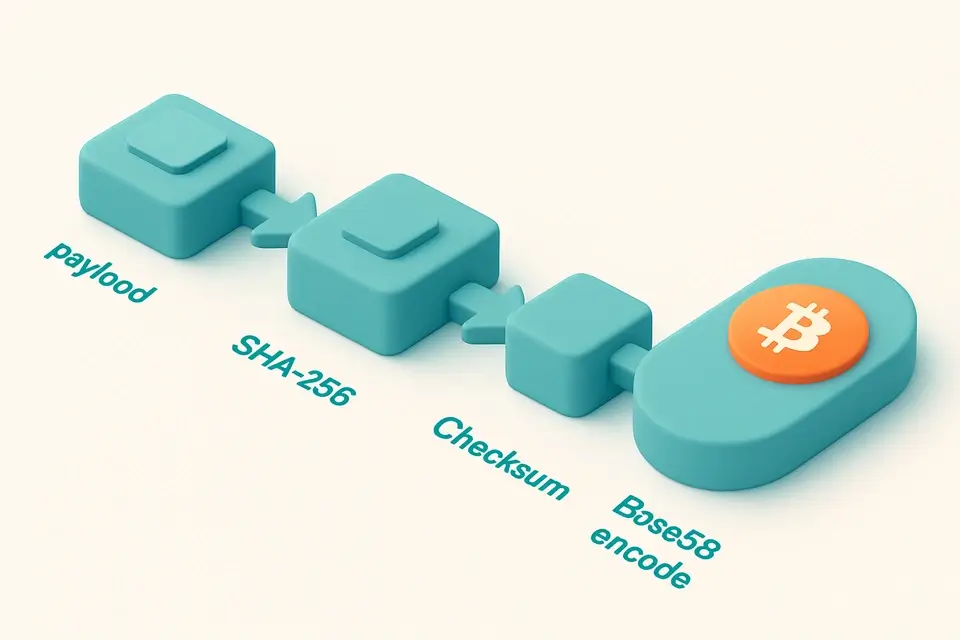
Base58Check extends Base58 encoding by appending a 4-byte checksum derived from a double SHA-256 hash of the payload. This format is used for Bitcoin addresses and WIF (Wallet Import Format) keys. The checksum allows detecting typos or corruption during transmission—a mistyped character will almost certainly fail validation. All processing runs client-side via the Web Crypto API; no data leaves your device. The encoding uses a 58-character alphabet that omits 0, O, I, and l to avoid visual confusion. Leading zero bytes in the payload become leading '1' characters in the output.
Why Use Base58Check Encoder?
-
Double-SHA-256 checksum for error detection
-
Base58 alphabet avoids visual confusion
-
100% client-side processing
Common Use Cases
Bitcoin addresses
Encode public keys with version prefix for P2PKH addresses.
WIF keys
Encode private keys for wallet import and export.
Education
Study checksum algorithms and error detection.
Testing
Validate Base58Check strings in development.
Technical Guide
The encoding pipeline works as follows. First, assemble the raw payload bytes, optionally with a version prefix byte. Second, compute SHA-256 over the payload, then SHA-256 again over that hash. Third, take the first four bytes of the second hash as the checksum. Fourth, append these four bytes to the payload. Fifth, encode the concatenated bytes using the Bitcoin alphabet (58 characters, no 0/O/I/l). Each leading zero byte in the numeric representation becomes a leading '1' character in the output. The checksum provides roughly one-in-four-billion chance that a random typo will pass validation.
Tips & Best Practices
-
1For BTC addresses and WIF keys
-
2Detects typos via 4-byte checksum
-
3Leading 1s represent zero bytes
-
4Adds checksum; differs from plain Base58
Related Tools
Base58 Encode
Encode text to Base58 format used by Bitcoin and IPFS.
🔐 Encoding & Crypto

Base58 Decode
Decode Base58-encoded strings back to plain text.
🔐 Encoding & Crypto

SHA-256 Hash Generator
Generate SHA-256 hash digests.
🔐 Encoding & Crypto
Bitcoin Address Validator
Validate Bitcoin addresses — Legacy, P2SH, Bech32.
🔐 Encoding & CryptoFrequently Asked Questions
Q Is this free?
Q What's the difference from Base58?
Q Where is Base58Check used?
Q Is my data safe?
Q Can I decode Base58Check?
About This Tool
Base58Check Encoder is a free online tool by FreeToolkit.ai. All processing happens directly in your browser — your data never leaves your device. No registration or installation required.